Home / Security / Phishing Emails Explained: How to Detect, Respond, and Protect Yourself [2025 Complete Guide]

Phishing Emails Explained: How to Detect, Respond, and Protect Yourself [2025 Complete Guide]

When an email feels urgent, suspicious, or just ‘too good to be true,’ pause and verify before you click or reply. The best defense against phishing is a mix of awareness, smart tools, and speaking up by reporting suspicious messages.

Estimated reading time: 9 minutes

phishing email article image

In today’s digital world, where our online footprints are everywhere—and often exposed—it’s crucial to understand why phishing emails pose such a serious threat. They can impact not only individuals but also businesses of all sizes.

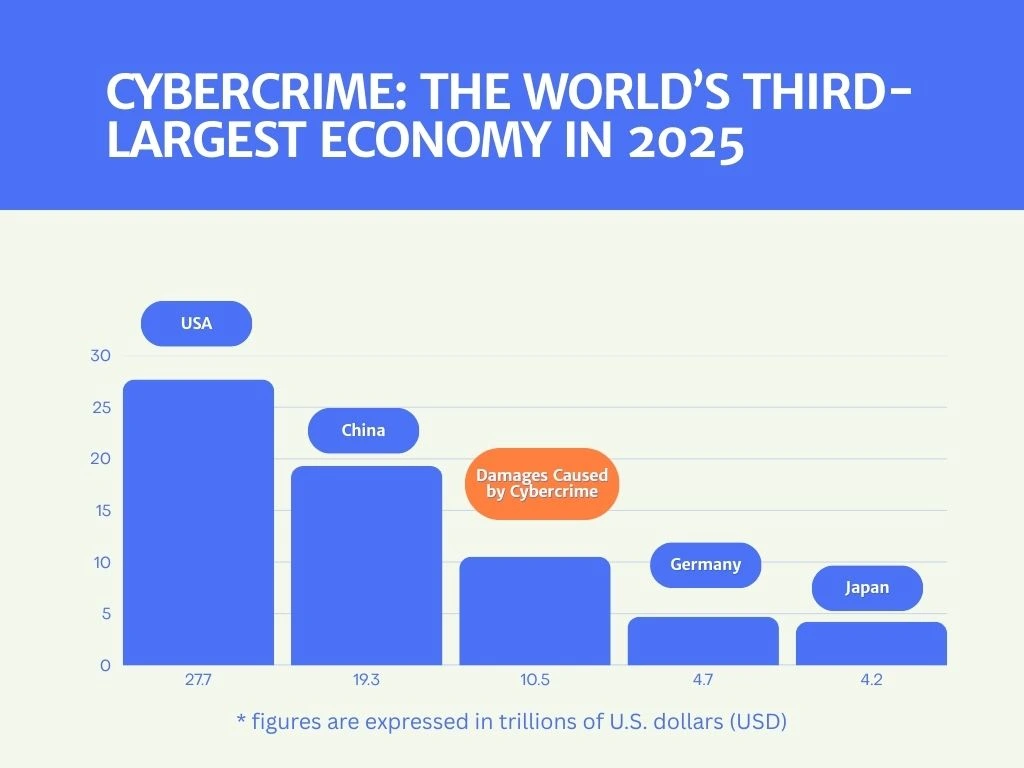
Statistics show that cybercrime is on a steady rise worldwide and is projected to reach $10.5 trillion annually by the end of this year. Phishing emails remain one of the most common tactics cybercriminals use to steal sensitive data. Every day, an estimated 3.4 billion of these emails are sent—57% of which target businesses.

What’s truly alarming is that 60% of security breaches are caused by human error. This shows that even though we’re aware of the risks, we’re still not well enough educated on how to prevent them.

grafic cu valoarea estimată adaunelor provocate de criminalitatea cibernetică

What is a phishing email?

Email phishing is a form of social engineering that tricks people into taking risky actions. Attackers often pose as trusted entities—such as banks, business partners, government agencies, or other well-known organizations—to increase their chances of success.

The Risks of an Email Phishing Attack:

  • Direct Financial Losses: these often take the form of fraudulent wire transfers or payments made to fake accounts.

  • Data Theft: this can include confidential customer information, financial data, trade secrets, or intellectual property.

  • Malware infections: clicking a malicious link or opening a malicious attachment can spread malware across the whole network.

  • Reputational Damage: customer and partner trust is often quickly eroded when a company’s security is compromised.

  • Fines and Legal Penalties: regulations such as GDPR or HIPAA can lead to heavy penalties for companies that fail to adequately protect personal data.


P.S.: The Caniphish team has put together a list of 50 phishing email examples from 2025.

7 Red Flags of Phishing Emails

To protect your business and avoid a potential security crisis, it’s essential to recognize the warning signs. Every phishing email shares certain distinct characteristics which, once identified, can save you from major risks.

Key things to be aware of:

1. Check the Sender’s Email Address

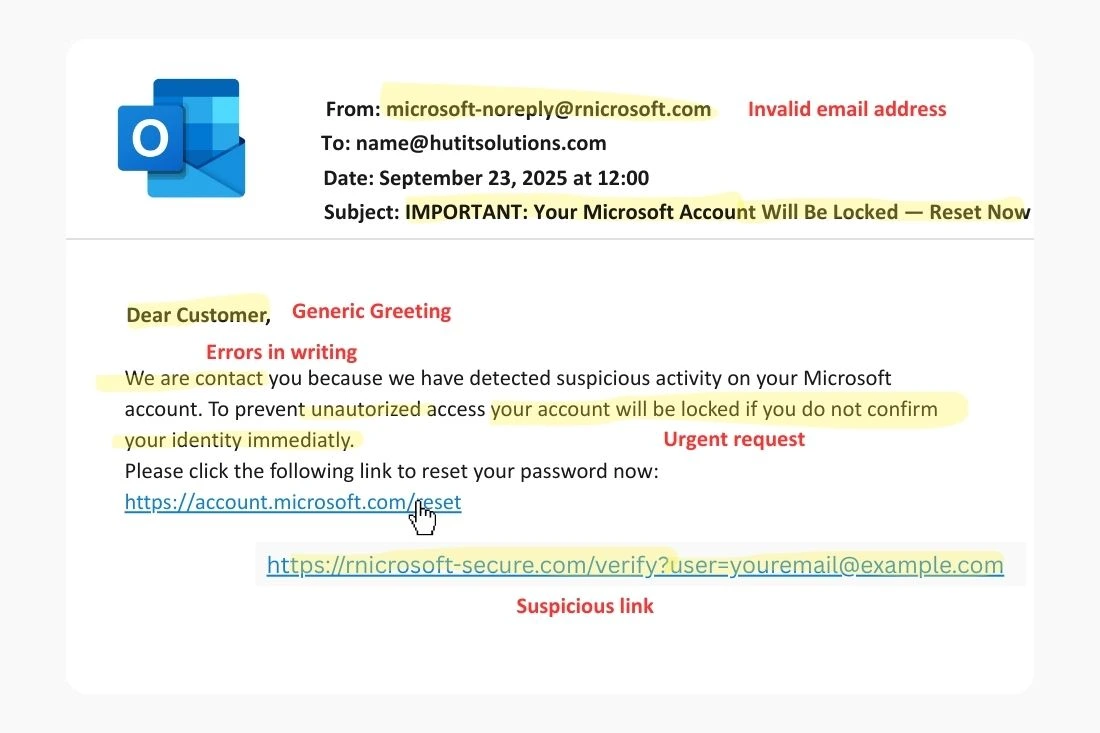
Attackers often use email addresses that look official but contain subtle changes. For example, you might see something like @rnicrosoft.com, which closely resembles @microsoft.com

⚠️  If it’s not clear who the email is from, don’t act on it impulsively!

2. Watch for Generic Openings

Most of the time, these emails use impersonal greetings like ‘Dear Customer’ or ‘Dear User’ instead of addressing you by name.

⚠️  Remember: even a phishing email might use your real name, so don’t let that trick you into trusting it.

3. Pressure to Act Fast

A common tactic is creating a sense of urgency with messages that pressure the recipient to act immediately. Typical examples include warnings like: ‘Your account will be locked within 24 hours if you don’t confirm now.

4. Poor Grammar and Typos

Phishing emails often contain awkward wording, translation errors, or writing mistakes. A legitimate organization always reviews its official communications before sending them out.

5. Shady Links

Simply hovering your cursor over a link (without clicking!) will reveal the actual URL. If it doesn’t match the official website address, it’s a strong sign of phishing.

6. Attachments You Weren’t Expecting

A file received from an unknown or unexpected sender is a major risk. Even if the subject line seems relevant, it’s best not to download the attachment and to report the message instead.

7. Strange or Odd-Looking URLs

If you accidentally click a link in a suspicious email, immediately check the address in your browser bar. Any difference from the organization’s official domain may indicate a phishing attempt.

exemplu email de tip phishing

How to Report Phishing Emails

When you receive a phishing email, it’s crucial not to ignore it. Reporting helps fight cybercrime—protecting not only you and your business, but others as well. Here’s where you can report a phishing email:

  • Directly in your email app: Most email providers (Gmail, Outlook, Yahoo) include a ‘Report phishing’ or ‘Report as spam’ option. Use this feature to alert the platform about the suspicious message.
  • Report it to government authorities: In the United States, you can report phishing and other cyber incidents through official channels. Two key options are: the FBI’s Internet Crime Complaint Center (IC3), where you can file a detailed complaint online, and the Federal Trade Commission (FTC), which tracks and investigates fraud and phishing attempts.

Reporting may seem like a small step, but it plays a big role in identifying and blocking future attacks. Don’t forget to delete the email from your inbox right after reporting it.


What to Do If You Fall for a Phishing Scam

If you replied to a phishing email or clicked a malicious link, don’t panic. What matters most is acting quickly to limit the consequences.

What to Do Right Away:

1. Disconnect from the internet, especially if you’re on your company’s network, to help stop any potential malware from spreading.

2. Change compromised passwords: update the passwords for any accounts you’ve accessed recently, and make sure the new ones are strong and unique.

3. Contact your bank or service provider: if you’ve shared financial information, immediately notify your bank to block any affected cards or accounts.

4. Run a full antivirus/antimalware scan: to detect and remove any malicious software installed on your device.

5. Notify your IT support team: immediately notify your IT department or security team. It’s essential for them to isolate the affected accounts or systems and investigate the incident.

6. Notify coworkers and business partners: If the attack targets your company, notify the relevant internal teams (IT, security, legal, compliance) and, if necessary, report the incident to the appropriate authorities or regulators (e.g., HIPAA, FTC).

How to Prevent and Detect Phishing Attacks

Keeping your business safe from phishing isn’t only about how you react after an attack. It’s a continuous process that takes proactive steps and consistency. Here are some of the best practices:

  • Employee education: people are often the weakest link. Hold regular training sessions to help staff recognize the signs of a phishing email and understand the risks. Use real-world examples and explain why their vigilance is essential for protecting the company.

  • Anti-phishing filters: use technical solutions that automatically scan emails and block suspicious messages before they reach employees’ inboxes.

  • Multi-Factor Authentication (MFA): enable MFA on all critical accounts. That way, even if an attacker gets hold of an employee’s password, access is blocked without the second authentication factor (usually a code generated on their phone).

  • Clear security policies: set strict rules for handling sensitive data, using public Wi-Fi networks, and downloading files from the internet. Consistent communication and full compliance with these policies by all employees are essential.

Frequently Asked Questions

Spam is generally unwanted email, usually promotional in nature. Phishing, on the other hand, is a cyberattack designed to steal sensitive data (passwords, banking details, personal information) or install malware.

Yes. Cybercriminals are constantly finding new ways to slip past spam filters. That’s why even with strong security tools in place, your own awareness is just as important.

Reporting suspicious emails helps protect the entire organization. When you mark a message as phishing or spam and notify your IT team, you contribute to the quick identification of threats and the improvement of security measures.

No. Phishing attacks can target both businesses and individuals. Scammers often use popular platforms—like personal email, online banking services, or social media—to try to steal your data.

Got a Suspicious Email?

Reach out to our team for fast help and hands-on anti-phishing training.

Phishing Email: Cum recunoști, reacționezi și previi atacurile de acest fel [Ghid complet 2025]

Phishing Emails Explained: How to Detect, Respond, and Protect Yourself [2025 Complete Guide]

Home / Phishing Emails: How to Recognize, React to, and Prevent These Attacks [Complete Guide...]